
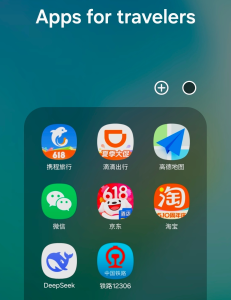
Introduction
Yes, having the right apps installed before you land in China is one of the most important steps you can take for a smooth trip in 2026. China operates on a mobile-first digital ecosystem, and many services you use at home—Google Maps, Uber Eats, even Google Play—simply don’t work inside mainland China.
This guide covers the essential apps every foreign traveler should download before departure, organized by real-world use cases, with links to our detailed setup guides for each tool. By the end, you’ll know exactly which apps are non-negotiable, which ones are helpful backups, and how to configure them with your passport and international phone number.
Quick Answer
The four apps you absolutely need before traveling to China are Alipay, WeChat, Didi, and a reliable map app such as Amap (Gāodé Dìtú) or Baidu Maps. Alipay and WeChat Pay both support international credit cards and passport registration, so you can pay almost anywhere by scanning a QR code. Didi provides an English interface and international card payment for rides. For navigation, Amap offers the best English experience, while Baidu Maps is more comprehensive but primarily in Chinese.
1-Minute Quick Setup Checklist
Save this checklist and complete these steps before boarding your flight:
- Download all apps from the official Apple App Store or Google Play Store—Google Play is not accessible after you arrive in mainland China.
- Register for Alipay and WeChat using your international phone number.
- Complete real-name verification with a clear photo of your passport information page.
- Link your international credit card to both payment apps.
- Download offline maps and translation packs for use without internet.
- Buy a local SIM card or eSIM immediately after clearing customs at the airport.
What You Need to Know Before You Start
Download Everything Before Departure
Google Play Store is not accessible in mainland China. You must download all essential apps before leaving your home country. Trying to install apps after arrival is extremely difficult and often requires alternative methods.
All apps listed in this guide are available on the Apple App Store and Google Play Store for international users.
Language and Registration
Most popular Chinese apps now offer official English interfaces for international users. Alipay, WeChat, Didi, Amap, and Trip.com all support English menus.
Almost all apps require real-name registration with your passport for security and regulatory reasons. You can register with your international phone number—no Chinese phone number is required for basic functions.
Internet Access Requirement
All apps require a stable internet connection to work properly. Make sure you have a local SIM card or eSIM with data before using these apps in China. For a complete breakdown of internet options, including SIM cards, eSIM, and public Wi-Fi, see our guide on how to get reliable internet in China.
Essential Apps Organized by Use Case
Payment Apps (Non-Negotiable)
Mobile payments are universal in China, and cash is rarely used in most urban areas. You will need at least one of these apps to pay for almost everything during your trip. Both apps use QR codes for payments—if you’re new to this system, our guide on QR codes for international travelers explains exactly how it works. For an objective overview of all payment methods, including cash and international credit cards, see our guide on whether China is truly cashless in 2026.
- Alipay (支付宝 Zhīfùbǎo) — The most widely used payment platform, accepted by over 90% of merchants. Supports international credit cards and passport registration with no Chinese bank account required. Our step-by-step Alipay setup guide walks you through every step from download to verification.
- WeChat Pay (微信支付 Wēixìn Zhīfù) — Integrated into the WeChat messaging app, equally widely accepted. Useful for peer-to-peer transfers and small purchases. Learn how to set up WeChat Pay as a foreigner in just a few minutes.
Transportation Apps
These apps will help you get around China quickly, affordably, and without language barriers.
- Didi (滴滴 Dīdī) — China’s largest ride-hailing platform, similar to Uber but with better coverage and lower prices. Offers full English interface, international credit card payment, and built-in translation for communicating with drivers. Our complete Didi guide includes tips for avoiding scams and finding the correct pickup spot at airports.
- Amap (高德地图 Gāodé Dìtú) — The most foreigner-friendly navigation app in China, with full English interface, accurate walking and transit directions, and reliable offline maps. It’s the best alternative to Google Maps. For a detailed walkthrough, see our complete Amap guide.
- Baidu Maps (百度地图 Bǎidù Dìtú) — Another solid navigation option with comprehensive local data, but its English support is more limited than Amap. If you’re comfortable with Chinese characters, Baidu can be useful.
- 12306 — The official app for booking high-speed rail and train tickets. Now supports English, foreign passport registration, and payment via Alipay or WeChat Pay. Learn how to book and take high-speed rail in China like a local.
For getting around within cities, also check out our guides on taking the subway and using shared bikes.
Internet & Communication Apps
Staying connected is essential for any trip to China. These apps will help you get online and communicate with locals and people back home.
- Local Carrier Apps — After purchasing a SIM card or eSIM, download the corresponding carrier app to check your data balance, recharge your plan, and contact customer service. The three major carriers are China Mobile, China Unicom, and China Telecom.
- WeChat — In addition to payment functions, WeChat is the primary messaging app in China. Most locals and businesses use WeChat for communication, so it’s essential to have it installed. Learn more about why WeChat is indispensable.
For detailed information on choosing the best SIM card or eSIM, see our guide on the best SIM cards and VPN tips for China travel. If you’re wondering which apps are blocked and need workarounds, check What Apps Are Blocked in China.
Travel & Accommodation Apps
These apps will help you book hotels, flights, and attraction tickets with ease.
- Trip.com — The best international travel platform for booking hotels, flights, and train tickets in China. Offers full English support, international payment options, and clearly marks hotels that accept foreign guests. See our Trip.com guide for step-by-step instructions.
- Ctrip (携程 Xiéchéng) — The largest online travel agency in China, with the most extensive selection of hotels and attractions. Has an excellent English interface and supports international credit cards.
For a complete guide to booking foreigner-friendly hotels, including how to avoid common mistakes, see our article on how to book hotels in China as a foreigner.
Daily Life Apps
These apps will make your daily life in China much easier and more convenient.
- Meituan (美团 Měituán) — The most popular food delivery and local services app in China. Offers English interface, international payment options, and delivery to most hotels and locations. You can order food, book restaurant tables, buy movie tickets, and much more. For a complete walkthrough, see our Meituan guide.
- Dianping (大众点评 Dàzhòng Diǎnpíng) — China’s equivalent of Yelp, providing restaurant reviews, menus, prices, and online booking. It’s a great tool for finding authentic local food, though its English interface may be limited.
If you want to explore Chinese food delivery more broadly, check how to order food delivery in China.
Utility & Translation Apps
These tools will help you overcome language barriers and navigate daily life. Instead of juggling multiple apps, we recommend reading our dedicated guide on how to use translation apps in China for a complete comparison and setup instructions.
- Pleco — The best Chinese-English dictionary app, with character recognition, stroke order, example sentences, and offline dictionaries. Essential for reading signs and menus.
- Microsoft Translator — Reliable real-time translation app that works in China, supports text, voice, and camera translation, and can be used offline.
- Apple Translator — Built into iPhones, works offline and provides adequate translations for basic communication.
Step-by-Step Complete Setup Guide
Follow these steps in order to set up all essential apps before your trip. If you’re arriving at a major airport, our China airport arrival guide walks you through the first 30 minutes after landing.
- Download all apps from the official Apple App Store or Google Play Store at least 3 days before departure.
- Open each app and switch the language to English in the settings menu (usually found under “Me” > “Settings” > “Language”).
- Register for an account using your international phone number. Enter the SMS verification code sent to your phone.
- Complete real-name verification by uploading a clear photo of your passport information page. Some apps may require a short video verification.
- Link your international credit card to Alipay and WeChat Pay. Make sure your card supports international online transactions.
- Download offline maps for the cities you will visit. Amap offers downloadable city maps, as does Baidu Maps.
- Download offline translation packs in Microsoft Translator or Apple Translator.
- Test each app to make sure it works properly before leaving home.
- After arriving in China, buy a local SIM card or eSIM at the airport and activate your data plan. See our SIM card guide for recommended options.
- You are now ready to use all apps and navigate China’s digital ecosystem.
Common Problems and Solutions
Payment Failed
- Cause: Your bank may have blocked international transactions or flagged China as high-risk.
- Solution: Contact your bank to enable international online payments. If one payment app fails, try the other—Alipay and WeChat Pay sometimes behave differently. For a deeper explanation of setting up payments, see our Alipay guide.
App Not Working or Crashing
- Cause: Outdated app version or unstable internet connection.
- Solution: Update the app to the latest version from the official store before travel. Restart your phone and try switching between mobile data and Wi-Fi.
Verification Issues
- Cause: Passport photo unclear or information mismatched.
- Solution: Retake the photo in good lighting with no glare. Double-check that your name exactly matches your passport. If problems persist, contact the app’s customer service.
Pro Real-Life Tips
- Only download apps from official app stores to avoid malware and scams. Never download APK files from untrusted websites.
- Enable push notifications for important updates and order confirmations from Didi, Meituan, and your hotel booking app.
- Save your hotel address in Chinese in your notes app for easy sharing with drivers—Didi’s built-in translation can help, but having it ready saves time.
- Keep your phone charged at all times—you will use it constantly for payments, navigation, and communication. Bring a portable power bank.
- Learn a few basic Chinese phrases, as mobile apps occasionally fail. Simple phrases like “thank you” and “I need help” go a long way.
- Always carry a small amount of cash as a backup for situations where mobile payments are not accepted, especially in very small shops or rural areas.
Common Mistakes to Avoid
- Waiting until you arrive in China to download apps. Google Play is not accessible in mainland China, so you will not be able to download them there.
- Downloading unofficial or pirated versions of apps. These may contain malware or steal your personal information.
- Forgetting to complete real-name verification. Most apps will not allow you to use their full features without verification.
- Not notifying your bank of your travel plans. This is the most common reason for payment failures.
- Relying on only one payment method. Always have at least two backup options—for example, Alipay and a physical credit card.
- Using public Wi-Fi for sensitive transactions like banking or payments. Use your mobile data instead for better security.
Frequently Asked Questions
Do I need a Chinese phone number to use these apps?
No. All essential apps support registration with international phone numbers. A Chinese phone number is only required for some advanced features that most travelers will not need.
Can I use Google Maps in China?
No. Google Maps is not accessible in mainland China. Amap (Gāodé Dìtú) is the best foreigner-friendly alternative with English interface and offline maps. See our Amap guide for setup instructions.
Are these apps free to download and use?
Yes. All apps listed in this guide are free to download. Some may charge fees for premium services or transactions, but basic features are always free.
Which apps are absolutely essential for a trip to China?
The four non-negotiable apps are Alipay, WeChat, Didi, and Amap. These will cover 90% of your daily needs during your trip.
Can I use my home country’s food delivery apps in China?
No. International food delivery apps like Uber Eats and DoorDash do not operate in China. Meituan is the best local alternative for food delivery. For more details, read our food delivery guide.
Conclusion
Downloading and setting up these essential apps before your trip will make your experience in China dramatically smoother. With just a few apps on your phone, you can pay for anything, get anywhere, order food, and communicate easily with locals.
By following this guide, you’ll be fully prepared to navigate China’s digital ecosystem like a pro. For more pre-trip preparation, explore our China travel packing list and how to exchange money in China. If you’re planning to visit attractions, don’t miss our attraction ticket guide.
- Improve your real-world Chinese communication skills with our Practical Chinese Listening resources.
- Build your reading proficiency with our Progressive Chinese Reading section.
- Master travel-specific phrases and dialogues in our Travel Chinese collection.
- Get personalized one-on-one instruction with our Premium Chinese Live Courses.
- Prepare for long-term stays in China with our Premium China Resources and survival materials.
Travel regulations, app policies, visa requirements, and payment services in China may change over time. Always verify important information through official sources before making travel decisions.